Barbershop Management Tool: Complete Guide with Barberia Club
Discover the best barbershop management tool. Barberia Club lets you manage appointments, barbers, services, and clients professionally. Say goodbye to phone calls for booking!

If you're a barber looking for a barbershop management tool that actually works, you've come to the right place. In the digital age, managing a barbershop with phone calls and paper agendas is no longer enough. You need a system that automates your bookings, organizes your team, and allows you to grow without limits.
Barberia Club is the best barbershop appointment app on the market, designed specifically for professionals looking to optimize their business. With this tool, your clients can book online anytime and from anywhere, while you focus on what you do best: cutting hair.
In this complete guide, we'll show you how this powerful management tool works, from initial registration to all the advanced features that will help you take your barbershop to the next level.
What is a Barbershop Management Tool?
A barbershop management tool is specialized software that allows you to manage all aspects of your business from one place. From appointment bookings to performance analysis, these tools digitize and automate processes that previously required time and manual effort.
The advantages of using a professional management tool are multiple:
- Time savings: No more phone calls interrupting your work
- Error reduction: The system prevents double bookings and schedule conflicts
- Professionalism: You project a modern and reliable image
- Growth: You can manage multiple barbers without complications
- Data analysis: You know your business in depth with detailed reports
Step 1: Initial Registration in Barberia Club
Getting started with Barberia Club is extremely simple. You just need to follow these steps:
- Go to https://barberiaclub.com/admin/register/
- Complete the form with:
- Barbershop name: The official name of your business
- Email: Your professional email address
- Country: Select your country of operation
- Password: Create a secure password
- Confirm your account and you're done! You can now start setting up your barbershop
The registration process takes less than 2 minutes and doesn't require a credit card or banking information. You can start using the tool immediately after registration.
Step 2: General Barbershop Configuration
Once registered, the next step is to configure the basic information of your barbershop. This information will be visible to your clients and will allow you to receive bookings professionally.
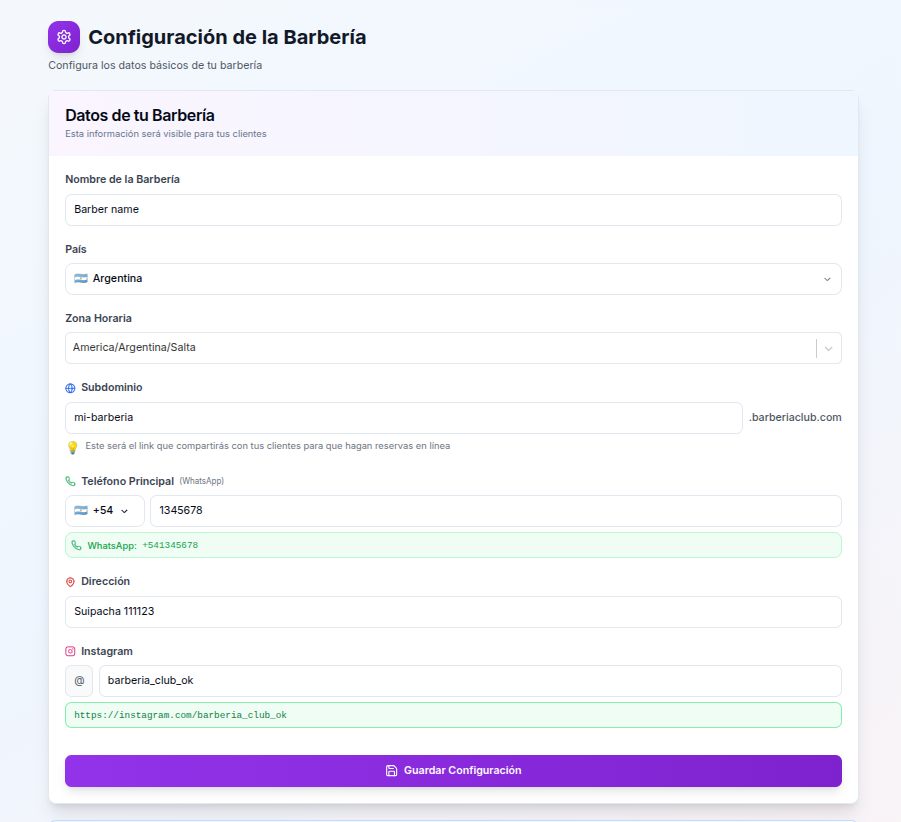
Data you need to configure:
- Time zone: Select your location's time zone so appointments are displayed correctly
- Subdomain: Create your personalized link (e.g., my-barbershop.barberiaclub.com) that you'll share with your clients for online bookings
- Main phone (WhatsApp): Set up your WhatsApp number to receive automatic notifications for each confirmed appointment. This keeps you informed without constantly checking the platform
- Address: Add the physical address of your barbershop so clients can easily find you
- Instagram: Connect your Instagram account. After each booking, the system automatically invites clients to follow you, helping you grow your social media presence
This initial configuration is fundamental because it defines how your clients will interact with your barbershop. A clear and professional subdomain, along with WhatsApp notifications, significantly improves the customer experience.
Step 3: Adding Barbers to Your Team
One of the most powerful features of this management tool is the ability to manage multiple barbers with individualized schedules. Each barber can have their own configuration, allowing you to manage large teams without complications.
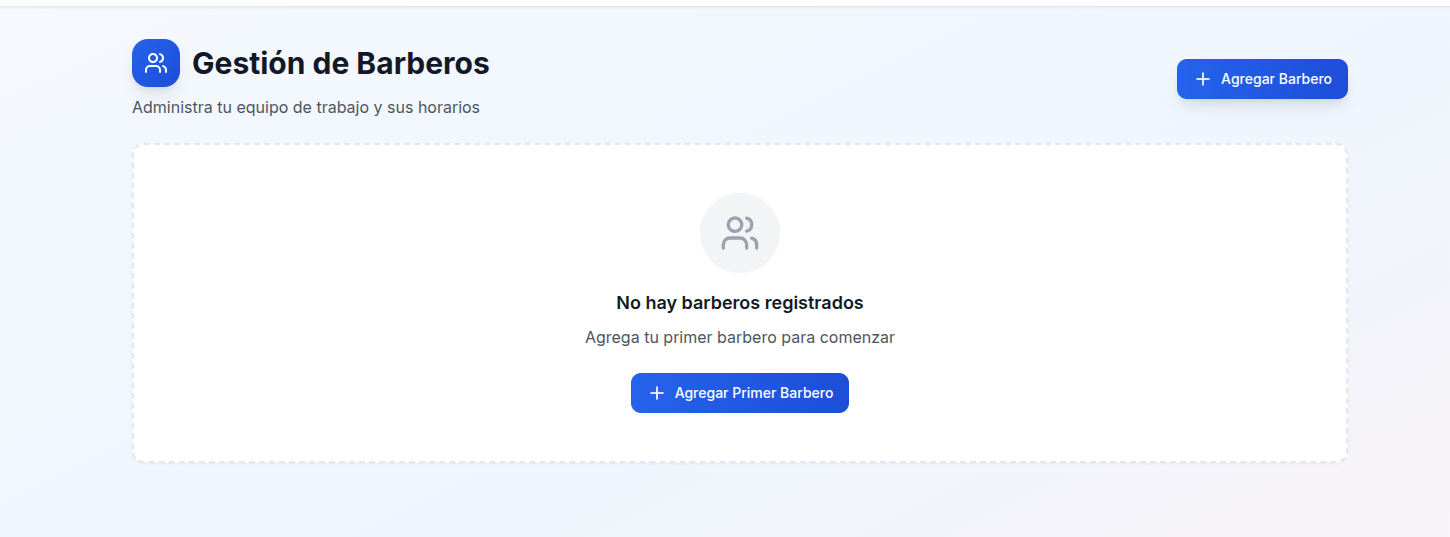
When you enter the barber management section, you'll see a clean interface that allows you to add, edit, and organize your work team.
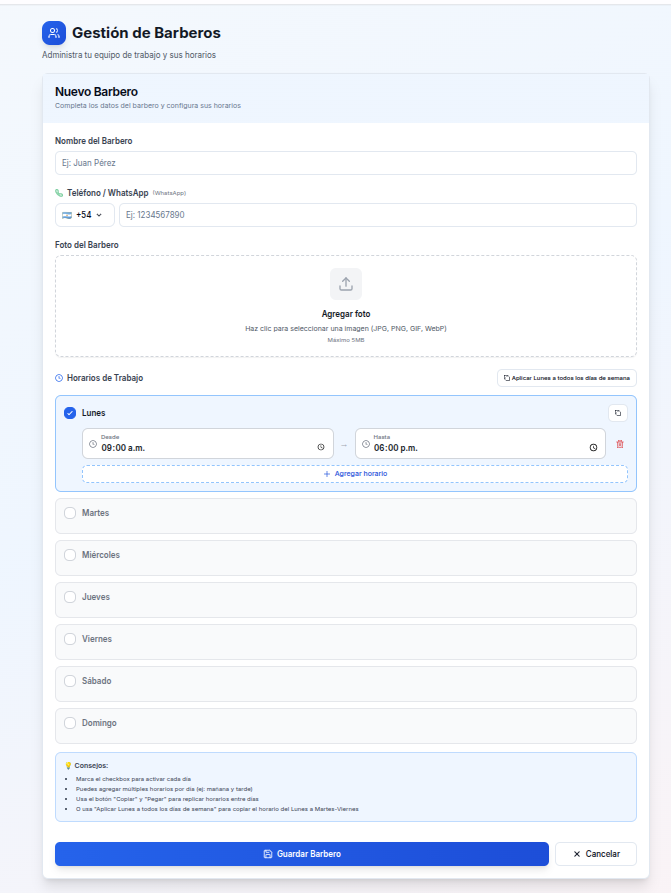
To add a new barber, you need to complete the following fields:
- Barber's name: The full name of the professional
- Phone / WhatsApp: Their contact number with country code. This number will receive notifications of their bookings
- Barber's photo: Upload a professional photo that will be shown to clients when booking. Accepted formats: JPG, PNG, GIF, WebP (maximum 5MB)
- Working hours: Configure available hours for each day of the week
Schedule Configuration: Total Flexibility
The tool offers exceptional flexibility for configuring working hours:
- Split schedules: You can add multiple time blocks per day (for example: 9:00 AM - 1:00 PM and 3:00 PM - 7:00 PM)
- Quick copy between days: Use the copy and paste function to replicate schedules between different days of the week
- Apply Monday to entire week: With one click, you can copy Monday's schedule to all weekdays (Tuesday to Friday), significantly speeding up the configuration process
- Specific days: Activate or deactivate individual days according to each barber's needs
This flexibility is especially useful when you have barbers with different schedules or when you need to quickly adjust the schedules of the entire team.
Step 4: Adding Services
Defining the services you offer is crucial so clients can book correctly. The tool allows you to create personalized services with specific durations and assign which barbers offer each service.
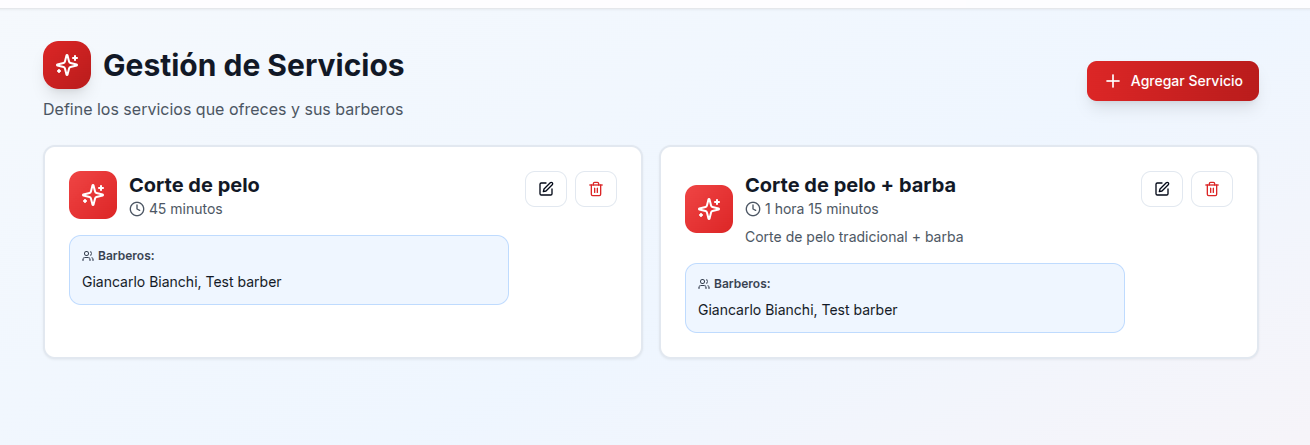
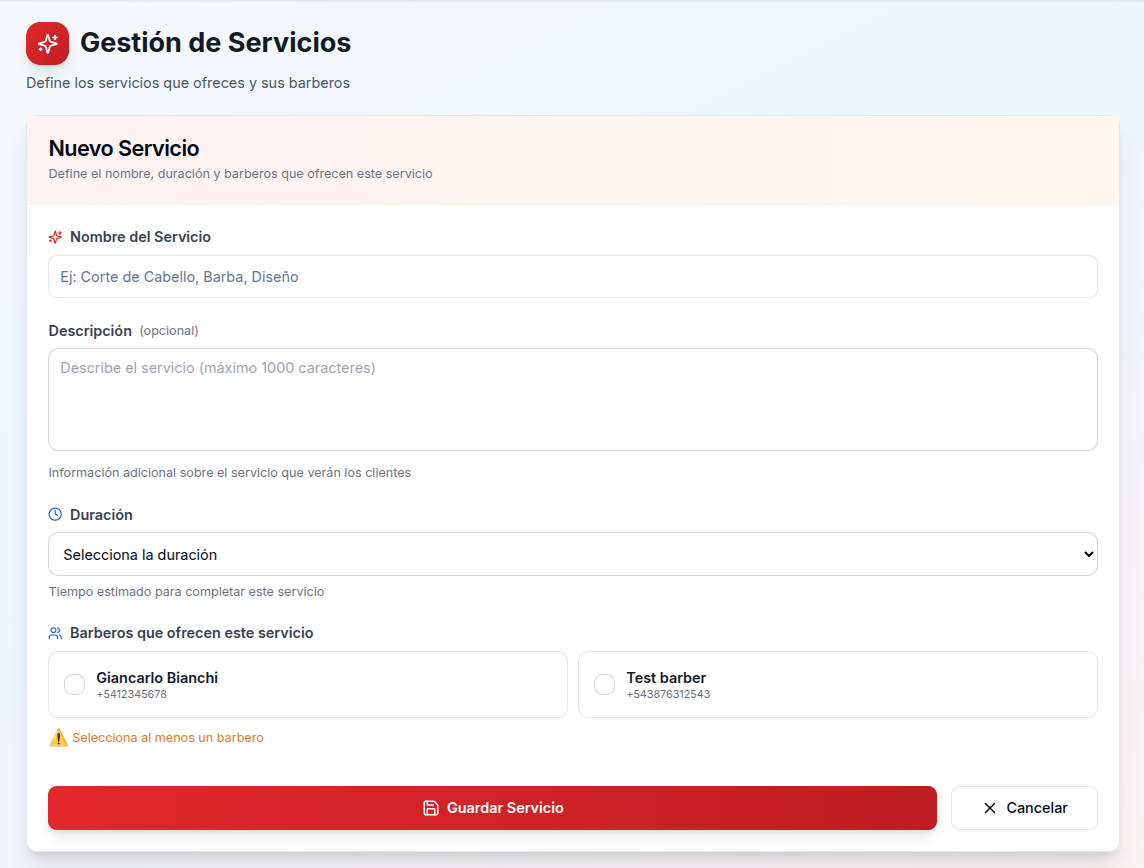
To create a service, complete the following information:
- Service name: The name clients will see (e.g., "Haircut", "Beard", "Haircut + Beard")
- Description (optional): Additional information about the service that helps clients understand what it includes. Maximum 1000 characters
- Duration: Select the estimated time it takes to complete the service. This determines how many appointments you can have in a day
- Barbers who offer this service: Select which barbers can perform this service. You can assign multiple barbers to the same service
Once created, services appear in visual cards that show all relevant information: name, duration, description (if you added one), and which barbers offer it. From each card you can easily edit or delete services.
Advanced Tool Features
In addition to basic barber and service management, Barberia Club offers advanced features that help you optimize your business and make data-driven decisions.
Block Schedules
Real life requires flexibility, and this tool understands that perfectly. You can block schedules for multiple reasons: vacations, meetings, maintenance, or any situation that requires no availability.
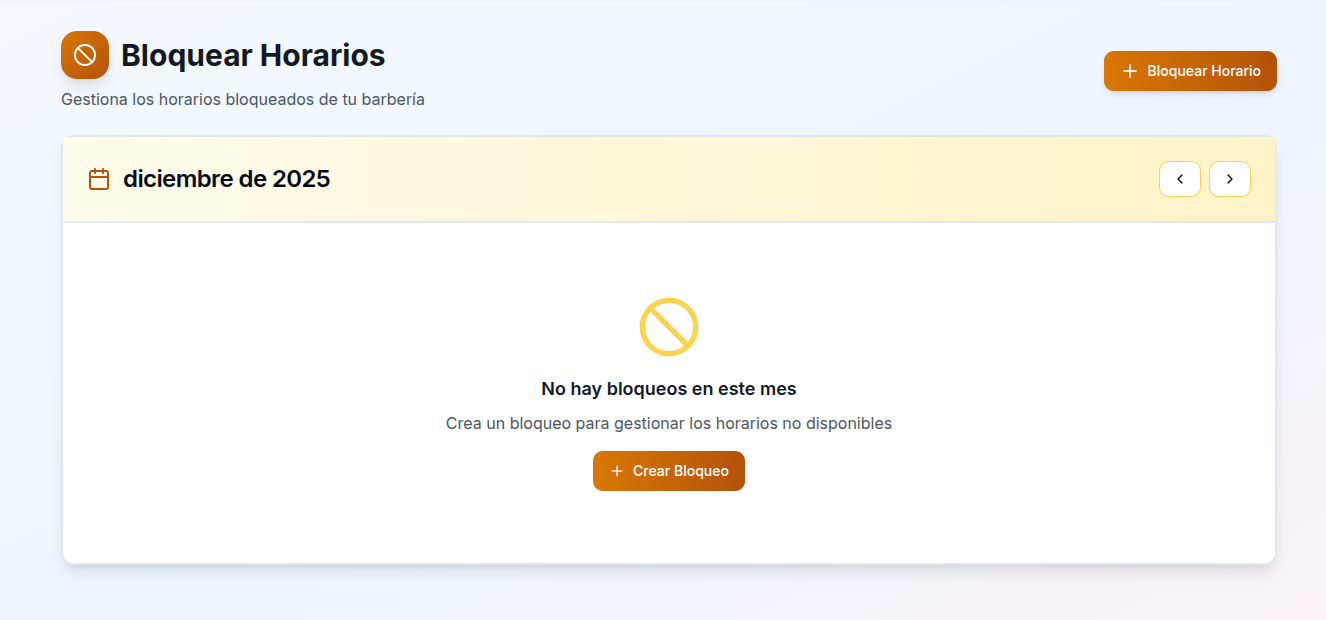
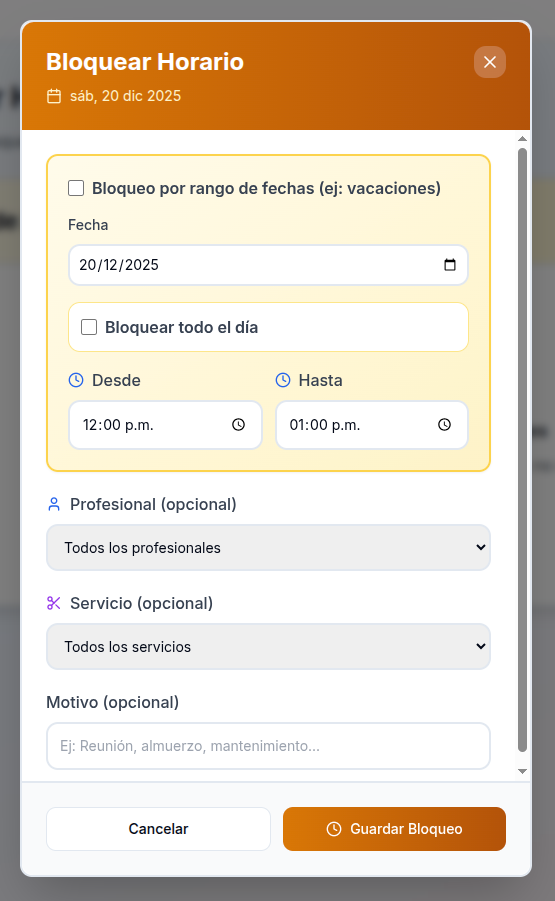
The blocking system is extremely flexible:
- Single date block: Block a specific day
- Date range block: Perfect for vacations or closing periods (e.g., from December 20 to January 5)
- Block entire day: Mark full days as unavailable
- Specific time block: Block only certain hours (e.g., from 12:00 PM to 2:00 PM for lunch)
- By professional: Block schedules for a specific barber or for all barbers
- By service: Block availability of a specific service or all services
- Combinations: You can combine these options (e.g., block a specific service for a particular barber during certain hours)
- Reason (optional): Add a note about the reason for the block for internal reference (e.g., "Meeting", "Lunch", "Maintenance")
This flexibility allows you to manage complex situations without losing control of your schedule.
Analytics and Statistics
Knowing your business in depth is key to growth. The management tool includes a complete analytics module that shows you important metrics about your barbershop's performance.
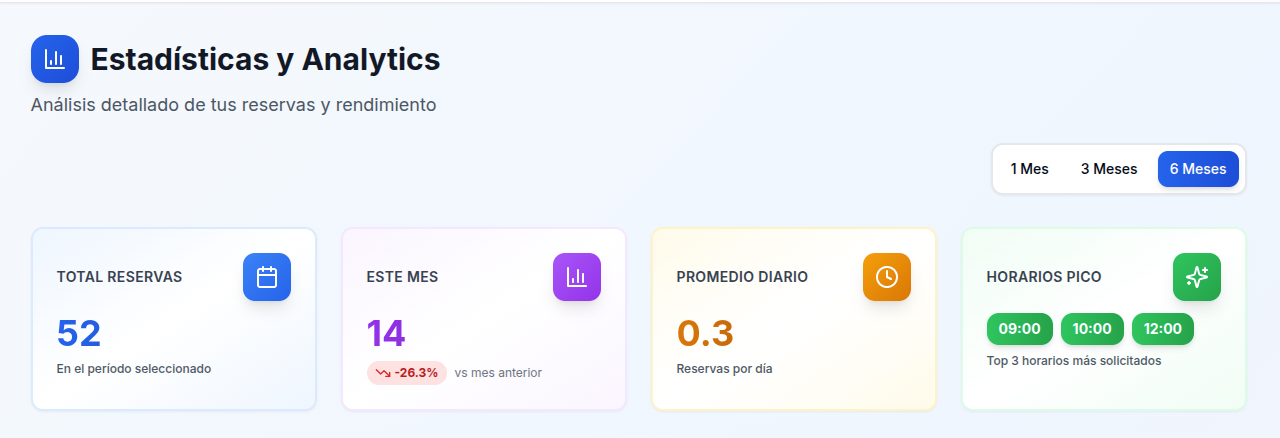
Available statistics include:
- Total bookings: Total number of appointments in different periods (1 month, 3 months, 6 months)
- This month's bookings: Comparison with the previous month showing percentage growth or decrease
- Daily average: Average number of bookings per day, useful for planning
- Peak hours: The 3 most requested times, helping you optimize your availability
- Most popular services: Which services are booked most frequently
- Bookings by day of the week: Identify which days are busiest
- Performance by barber: Individual statistics for each professional on your team
This data allows you to make informed decisions about schedules, services, and growth strategies. For example, if you see that Friday afternoons are your peak hours, you can consider adding more availability during those times.
Client Management
Maintaining a complete history of your clients helps you offer personalized service and build long-term relationships.
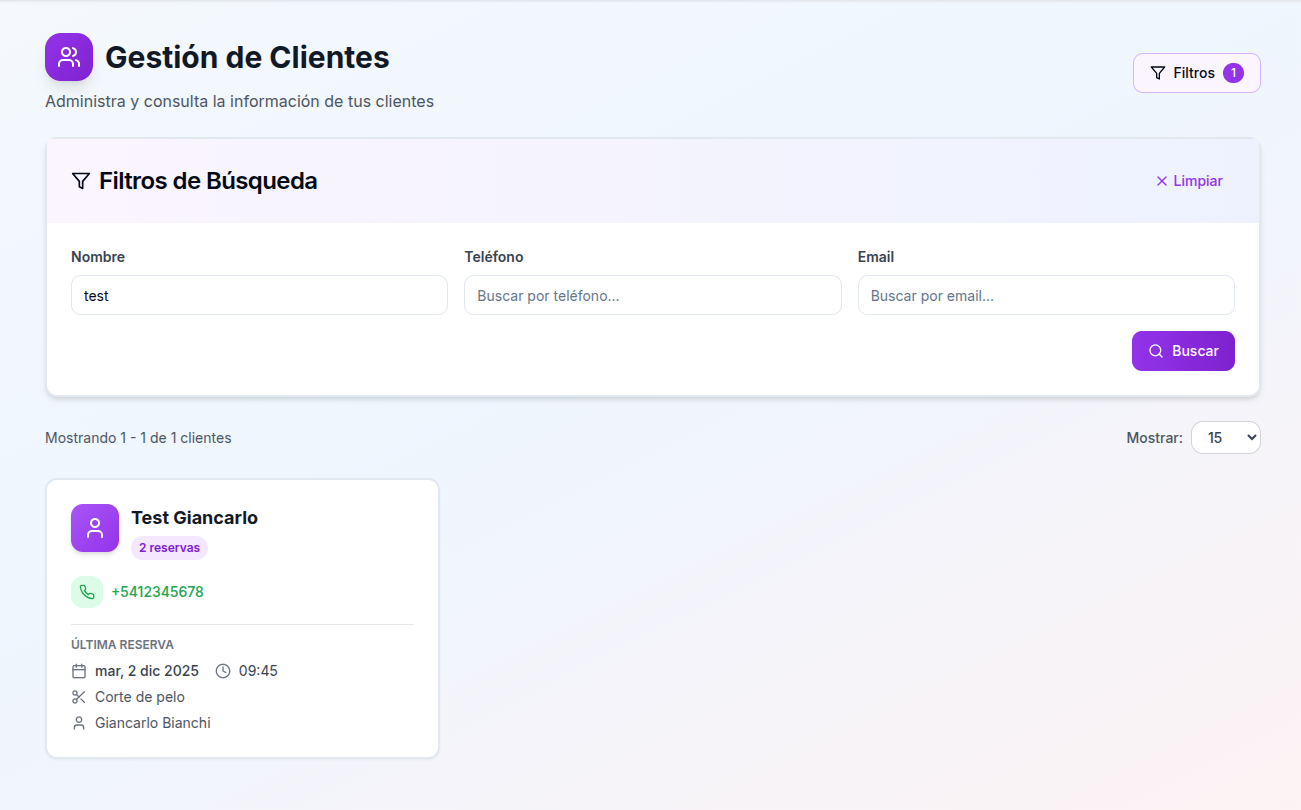
In the clients section you can:
- View all your clients: Complete list of people who have booked at your barbershop
- Search clients: Filter by name, phone, or email to quickly find the information you need
- Booking history: View all past bookings for each client, including date, time, service, and barber
- Contact information: Quick access to each client's phone and email
- Statistics per client: Total number of bookings made by each person
This information is invaluable for remembering client preferences, identifying frequent clients, and personalizing your service.
Advantages of Using a Professional Management Tool
Implementing a management tool like Barberia Club completely transforms the way you operate your barbershop:
For the Barber
- Fewer interruptions: No more phone calls during work
- Automatic organization: The system prevents schedule conflicts
- More time for the client: You can focus completely on service
- Reduced no-shows: Automatic notifications reduce no-shows
- Performance analysis: You know what works and what doesn't in your business
For Clients
- 24/7 bookings: They can book anytime, even outside business hours
- No phone waits: They don't need to call and wait for a response
- Automatic reminders: They receive notifications before their appointment
- Transparency: They see all services, prices, and availability in real time
- Ease of use: Intuitive interface that anyone can use
For the Business
- Scalability: You can add barbers without complications
- Professionalism: You project a modern and reliable image
- Social media growth: Automatic integration with Instagram
- Data for decisions: Detailed analytics for growth strategies
- Cost reduction: Less time lost on manual management
Frequently Asked Questions about Barbershop Management Tools
Is it difficult to learn how to use this tool?
No, Barberia Club is designed to be intuitive. Most barbers can set up their barbershop in less than 30 minutes. Additionally, the interface is clear and easy to navigate.
Can I use this tool if I work alone?
Absolutely. The tool works perfectly for individual barbers and automatically adapts when you add more professionals to your team.
Do clients need to download an app?
No, clients don't need to download anything. They access your personalized link from any browser on their phone, tablet, or computer.
What happens if a client cancels or modifies their booking?
You'll receive an immediate notification via WhatsApp. You can manage all bookings from your admin panel, and the system automatically updates availability.
Can I integrate this tool with my website?
Yes, you can integrate the booking system into your existing website or use the personalized link provided by the platform.
Is there a limit on the number of barbers or services?
No, you can add as many barbers and services as you need. The tool is designed to grow with your business.
Comparison with Other Management Tools
While other barbershop management tools like Booksy or Fresha offer similar features, Barberia Club stands out for:
- Specific focus: Designed exclusively for barbershops, not general beauty salons
- WhatsApp notifications: Native integration with WhatsApp for direct communication
- Spanish interface: Completely localized for the Spanish-speaking market
- No commissions: We don't charge a percentage per booking
- Flexible configuration: Split schedules and advanced blocking options
Conclusion
A professional barbershop management tool like Barberia Club is not a luxury, it's a necessity in today's market. Clients expect to be able to book online, and barbers need systems that allow them to work efficiently without constant interruptions.
From initial registration to configuring barbers, services, and blocked schedules, this tool covers all the management needs of a modern barbershop. Analytics and client management features give you the information you need to make smart decisions and grow your business.
Best of all, getting started is completely free and takes less than 30 minutes. You don't need technical knowledge or previous experience with management software. You just need to follow the steps we've shown you in this guide.
If you want to complement this management tool with practical tips to improve your barbershop, we recommend reading our article on tips for barbershop, where you'll find valuable strategies to grow your business.
Ready to transform your barbershop? Register with Barberia Club today and discover why hundreds of professional barbers trust this tool to manage their businesses.
With Barberia Club, say goodbye to phone calls for booking appointments and give your clients the modern experience they expect!
Tags
Barberia Club Team
Barbería Club Team - Barbershop management experts with years of experience in the industry